Build log
Building Netflix-style seek previews: one sprite sheet, one WebVTT file
A video thumbnail service in Python: streamed uploads, a SHA-256 content cache, Celery, FFmpeg and WebVTT sprite maps, with benchmarks and five fixes.
By Winson GR · · 11 min read · Source on GitHub
Hover over the progress bar on Netflix or YouTube and a small thumbnail shows you that moment of the video. It looks like the player is seeking in the background. It isn’t. The player downloaded one image containing every thumbnail, plus a small text file that says which rectangle of that image belongs to which second.
This post is about the service that produces those two files. It is a Python API with FastAPI, Celery, Redis and FFmpeg, built around the parts that make video processing awkward: uploads that are hundreds of megabytes, work that takes seconds or minutes, and users who upload the same file twice. The full source, tests and Docker setup are on GitHub.
The headline result: a 5-minute 720p video becomes a sprite sheet in 1.88 s, a 4K VP9 clip takes 35.6 s, and uploading the same video again - under any filename - returns the cached result in about 46 ms. Five things need fixing before production; they are covered at the end.
How seek previews work
The output is two files. The first is a sprite sheet: thumbnails taken every two seconds, scaled to 160×90 and stitched into one JPEG, five per row. The second is a WebVTT file, the same format used for subtitles, where each cue’s text is a URL to the sprite with a media fragment naming one cell:
WEBVTT

00:00:00.000 --> 00:00:02.000
/sprites/3f9a….jpg#xywh=0,0,160,90

00:00:02.000 --> 00:00:04.000
/sprites/3f9a….jpg#xywh=160,0,160,90

00:00:10.000 --> 00:00:12.000
/sprites/3f9a….jpg#xywh=0,90,160,90
When the pointer is over 0:11, the player finds the cue covering that time, loads the sprite once, and crops the 160×90 rectangle at x=0, y=90. Players such as JW Player and Plyr read this format directly, so the service never needs to know which player is used.
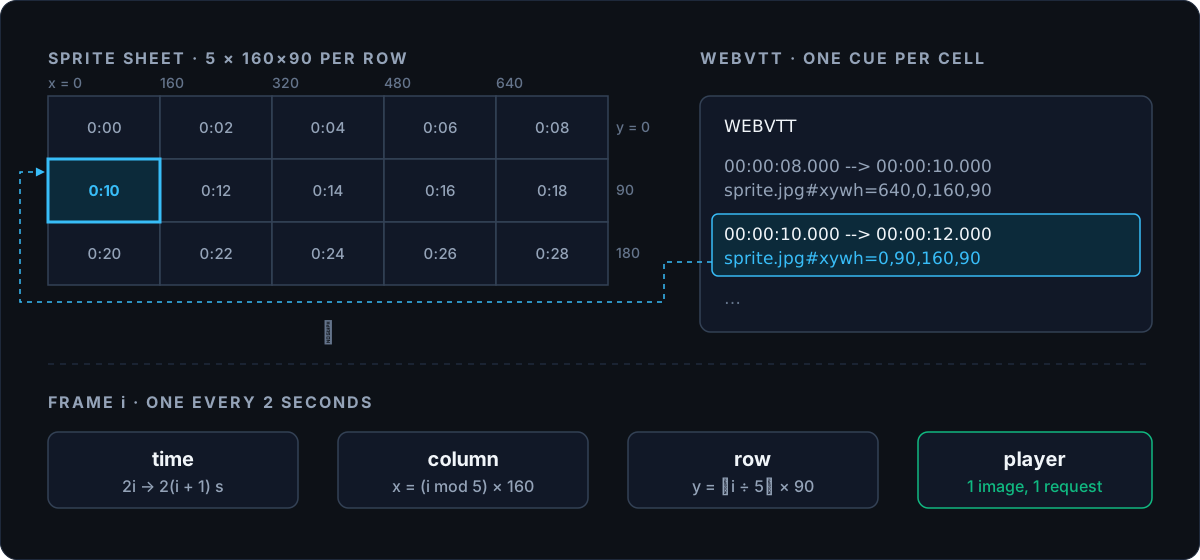
Generating the cue list is arithmetic. Frame i covers i × 2 to (i + 1) × 2 seconds and lives at column i mod 5, row i ÷ 5:
for index in range(frame_count):
    start_s = index * interval_s
    end_s = (index + 1) * interval_s
    x = index % cols * frame_width
    y = index // cols * frame_height
    lines.append(f"{format_timestamp(start_s)} --> {format_timestamp(end_s)}")
    lines.append(f"{sprite_url}#xywh={x},{y},{frame_width},{frame_height}")
    lines.append("")
One image instead of hundreds means one HTTP request instead of hundreds, and it can be cached by a CDN like any other static file.
Architecture
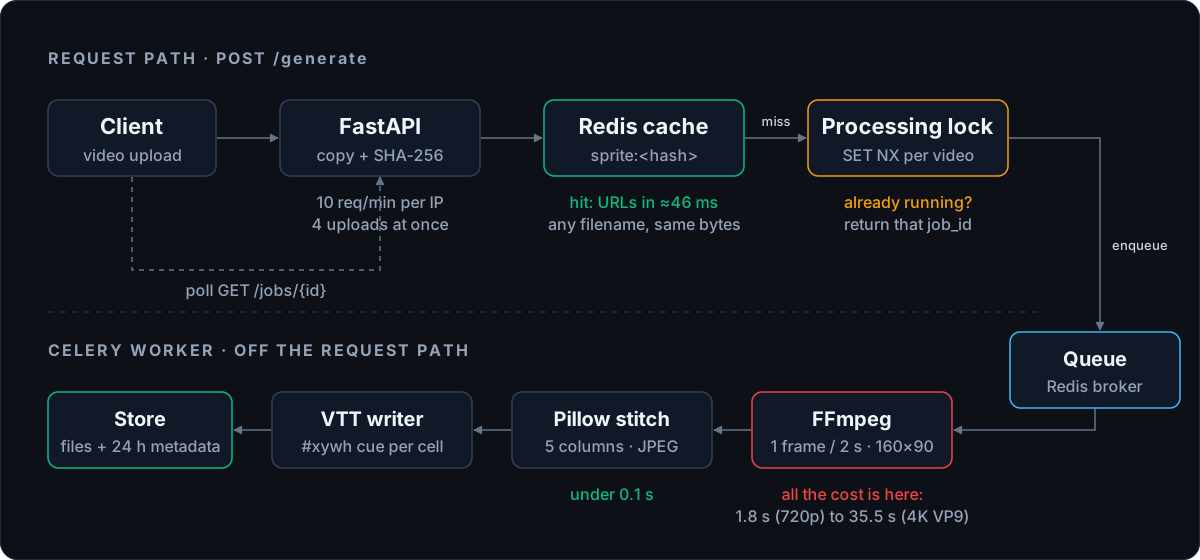
The API answers quickly and never does the heavy work itself. A request either returns a cached result straight away or returns a job ID that the client polls. The slow part - decoding video - runs in a separate Celery worker.
The upload path
Hashing in one pass
A 500 MB upload can’t be read into memory on an API container with a 256 MB limit. The handler copies it to disk in 1 MB chunks and updates a SHA-256 hash with each chunk on the way through, so the hash is ready the moment the last byte is written:
async with aiofiles.open(tmp_path, "wb") as output_file:
    while chunk := await file.read(1024 * 1024):
        total_size += len(chunk)
        if total_size > settings.max_upload_bytes:
            raise FileTooLargeError(
                f"Upload exceeds {settings.max_upload_bytes // 1_048_576} MB limit"
            )
        sha256.update(chunk)
        await output_file.write(chunk)
The size check runs inside the loop as well as against the Content-Length header, because a client can lie about the header. An asyncio.Semaphore allows four of these copies at once. As the first fix at the end of this post explains, this loop reads from a file FastAPI has already received, which matters more than it looks. After the copy, python-magic checks the file’s real type from its bytes, not from its name.
A cache keyed by content, not filename
The SHA-256 of the bytes is the cache key. trailer.mp4 and trailer-final-v2.mp4 with identical content produce the same hash, so the second upload skips processing entirely and gets the sprite and VTT URLs back in about 46 ms. Every output file is named after the hash too (/sprites/<hash>.jpg), which makes the outputs immutable: a URL always points to the same bytes, so a CDN can cache it forever.
One job per video, even under concurrent uploads
A cache only helps once the first job has finished. If two people upload the same video a second apart, both miss the cache. Without protection, both would start a job and the worker would decode the same video twice. The service takes a per-video lock with SET NX before queuing:
existing_job_id = await get_processing_job_id(redis, file_hash)
if existing_job_id is not None:
    return GenerateResponse(job_id=existing_job_id, status=JobStatus.queued, cached=False)

job_id = uuid.uuid4().hex
acquired = await acquire_processing_job(redis, file_hash, job_id)
if not acquired:
    duplicate_job_id = await get_processing_job_id(redis, file_hash)
    return GenerateResponse(job_id=duplicate_job_id, status=JobStatus.queued, cached=False)
acquire_processing_job is SET processing:<hash> <job_id> NX EX 86400. Only one request can create the key. The loser reads the winner’s job ID and polls the same job. This is the same idea as a cache-stampede guard: when many requests want the same expensive result, let one of them compute it.
Rate limiting
Uploads are limited to 10 per minute per IP with a fixed-window counter:
async with redis.pipeline(transaction=False) as pipe:
    pipe.set(key, 0, nx=True, ex=60)
    pipe.incr(key)
    results = await pipe.execute()
count = int(results[1])
The naive version - GET the count, compare, then INCR - lets two concurrent requests both read 9 and both pass. Here the decision uses the value INCR returns, and INCR is atomic in Redis, so every request sees a distinct count. The pipeline itself isn’t a transaction; it just sends both commands in one round trip.
The processing path
Why the work runs in Celery
Decoding video takes seconds of CPU per job. Inside FastAPI’s event loop, that would stall every other request on the same process, including health checks and cache hits. Celery runs each job in a separate worker process, and three settings make it behave well for long jobs:
celery_app.conf.update(
    task_acks_late=True,
    task_reject_on_worker_lost=True,
    worker_prefetch_multiplier=1,
)
task_acks_late acknowledges a job only after it finishes, so a worker that crashes mid-decode leaves the job to be picked up again instead of losing it. worker_prefetch_multiplier=1 stops a worker from reserving extra jobs it can’t start yet; with the default prefetch, a short job can wait behind a 4K decode on a busy worker while another worker sits idle.
Extracting frames with FFmpeg
command = [
    "ffmpeg", "-y",
    "-skip_frame", "noref",
    "-i", str(input_path),
    "-vf", f"fps=1/{settings.frame_interval_s},scale={settings.frame_width}:{settings.frame_height}",
    "-q:v", "3",
    "-threads", "0",
    output_pattern,
]
The fps=1/2 filter keeps one frame every two seconds, but FFmpeg still has to decode the video to get there: a 5-minute clip at 25 frames per second is about 7,500 decoded frames for 150 thumbnails. -skip_frame noref tells the decoder to skip frames that no other frame depends on, which cut extraction time by about 17% on the 4K VP9 clip. The subprocess runs under a 300-second timeout and is killed if it overruns, so one malformed file can’t hold a worker forever. Pillow then pastes the frames into the grid and saves one JPEG.
Benchmarks
Measured in Docker on an Apple M-series laptop, with the worker limited to 4 CPUs and 1 GB of memory:
| Video | Thumbnails | Extract | Stitch | Total |
|---|---|---|---|---|
| 1-minute 720p | 30 | 0.57 s | 0.01 s | 0.58 s |
| 5-minute 720p | 150 | 1.84 s | 0.04 s | 1.88 s |
| 5-minute 4K VP9 | 147 | 35.5 s | 0.06 s | 35.6 s |
| Same video again (cache hit) | - | - | - | ≈ 46 ms |
Stitching never matters: under a tenth of a second even for 150 frames. The whole cost is decoding, and it depends on the source far more than on the length. The 4K VP9 clip produces almost the same number of thumbnails as the 720p one but takes 19 times longer, because each source frame has nine times the pixels and VP9 is expensive to decode in software. More worker concurrency doesn’t help one job; the decoder is the ceiling.
For a service like this, that means capacity planning is about the mix of inputs, not the number of requests. A queue that handles 30 phone videos a minute can be blocked for half a minute by a single 4K upload.
The 147-thumbnail sheet from the 4K clip is 800×2700 pixels and 468 KB.
What to change before production
Reading the code against real failure cases turns up five issues.
1. The whole upload arrives before any check runs. The handler takes an UploadFile, and FastAPI parses a multipart form before it calls the handler: Starlette receives the entire body and spools the file into a temporary file. So by the time the rate limiter, the Content-Length check, the semaphore or the 1 MB loop runs, every byte is already on disk. A client over its rate limit still uploads its whole file first; a 5 GB upload is written to the temp directory in full before the 500 MB limit rejects it; and every accepted upload is written to disk twice, once by Starlette and once by the copy loop. Because the spool has no size cap, a few large uploads can fill the disk. The fix is to read request.stream() directly and do the hashing, size limit and write in that one loop, with the rate limit and Content-Length check moved into middleware that runs before the body is read - or, better for large files, to have clients upload straight to object storage with a presigned URL and only send the API the result.
2. A failed video is stuck for 24 hours. When a job fails, fail_and_retry marks it failed and asks Celery to retry, but it never releases the processing:<hash> lock, which has a 24-hour TTL. Once the three retries are used up, every new upload of that video finds the lock, gets the dead job’s ID back with status queued, and polls a job that will never run again. There are two smaller problems on the same path: the job status says failed during the 10 seconds before each retry, so a polling client may give up on a job that is about to succeed; and deterministic failures, such as a corrupt file, are retried three times, each up to the 300-second FFmpeg timeout. The fix is to release the lock on final failure, report retrying instead of failed between attempts, and not retry errors that will fail the same way again.
3. The job queue can be evicted. The cache, the Celery broker and the result backend are three database numbers on one Redis instance, and that instance runs with maxmemory 256mb and maxmemory-policy allkeys-lru. A memory limit applies to the whole instance, not per database. When the cache fills up, Redis is allowed to evict any key - including the list that holds queued jobs, or a job’s processing lock. Queued work would disappear without an error. The broker needs its own Redis with noeviction, or a broker built for it, while the cache keeps LRU eviction.
4. One sprite sheet stops working at about two hours. The sheet grows by 90 pixels for every 10 seconds of video. JPEG can’t store an image taller than 65,500 pixels, which is 727 rows, or 3,635 thumbnails, or 2 hours and 1 minute at one thumbnail every two seconds. A longer film fails in the stitch step. Well before that limit, the sheet is a problem for the viewer: at the sample’s density, a two-hour film produces a sheet of roughly 11 MB that has to download before the first preview appears. Production players split thumbnails into pages - for example 10×10 grids of 100 thumbnails - and the VTT file simply points different cues at different images. That fixes the size limit and lets the player load only the page near the cursor.
5. The cache forgets, the disk doesn’t, and a hit still costs a full upload. The metadata in Redis expires after 24 hours, but the uploaded video and the generated sprite and VTT files are never deleted. Disk use grows forever, and after a day the same video is processed again even though its sprite is still on disk under the same hash. Since every output is content-addressed, the files themselves can be the cache: check whether <hash>.jpg exists in object storage, and give the bucket a lifecycle rule instead of relying on a TTL. The 46 ms cache hit also starts only after the whole file has been uploaded. Letting the client hash the file and ask “do you have this hash?” before uploading would turn a repeat upload of 500 MB into one small request.
Two smaller notes. The rate limiter’s SET NX EX and INCR are separate commands, so if the key expires between them, INCR creates a new key with no expiry, and that IP stays over the limit until someone deletes the key. Running INCR first and then EXPIRE key 60 NX avoids that. And request.client.host is the address of whatever is directly in front of the API; behind a load balancer, every user shares the balancer’s IP and its 10-uploads-a-minute limit.
What Netflix does differently
This is one worker and one Redis. A service at Netflix’s scale differs in the ways you would expect from any system design answer:
| At scale | This project |
|---|---|
| A fleet of encoding workers, split by chunk | One Celery worker |
| Thumbnails served from a CDN | FastAPI static files |
| Several thumbnail sizes for different screens | One 160×90 size |
| Durable metadata store | Redis with a 24-hour TTL |
The important parts carry over unchanged: content-addressed outputs that never change once written, one image per many thumbnails, slow work moved off the request path, and one job per input no matter how many people ask for it.
Try the design yourself
Thumbnails are a small part of video delivery; the large part is getting the video bytes to millions of viewers from caches close to them, and surviving the moment a new show launches and every cache is cold. Design Netflix’s video delivery walks through that design, and The Stampede challenge lets you run it: keep a cache-backed system alive when the cache restarts empty under load, then compare your design with the reference.
The full source, with docker compose up to run the API, worker, Redis and Flower, is at github.com/winsongr/netflix-sprite-engine.