System design practice for backend engineers
Find where your system design breaks, and what it costs.
Build with real AWS sizes, from t4g.micro to r7g.2xlarge. Send up to 20,000 requests a second, then see which component fails first, why, and what the design costs per month.
- Free
- No signup
- Runs in your browser
- Real AWS prices
The problem
Knowing the components isn't the same as designing the system.
You know what Redis, Kafka and Postgres do. The interview - and the job - asks when to use each one, how much load it takes, and what breaks first.
A whiteboard accepts any design
Boxes and arrows never run out of capacity. You only find out a design was wrong once real traffic arrives.
Videos can't answer “what if?”
What if traffic triples, or the cache is flushed? A course shows one answer. Here you try yours and see what happens.
Production is an expensive teacher
Most engineers learn about cache stampedes and failover during an incident. You can learn them in a browser tab instead.
How it works
Design it. Break it. See why.
Design it
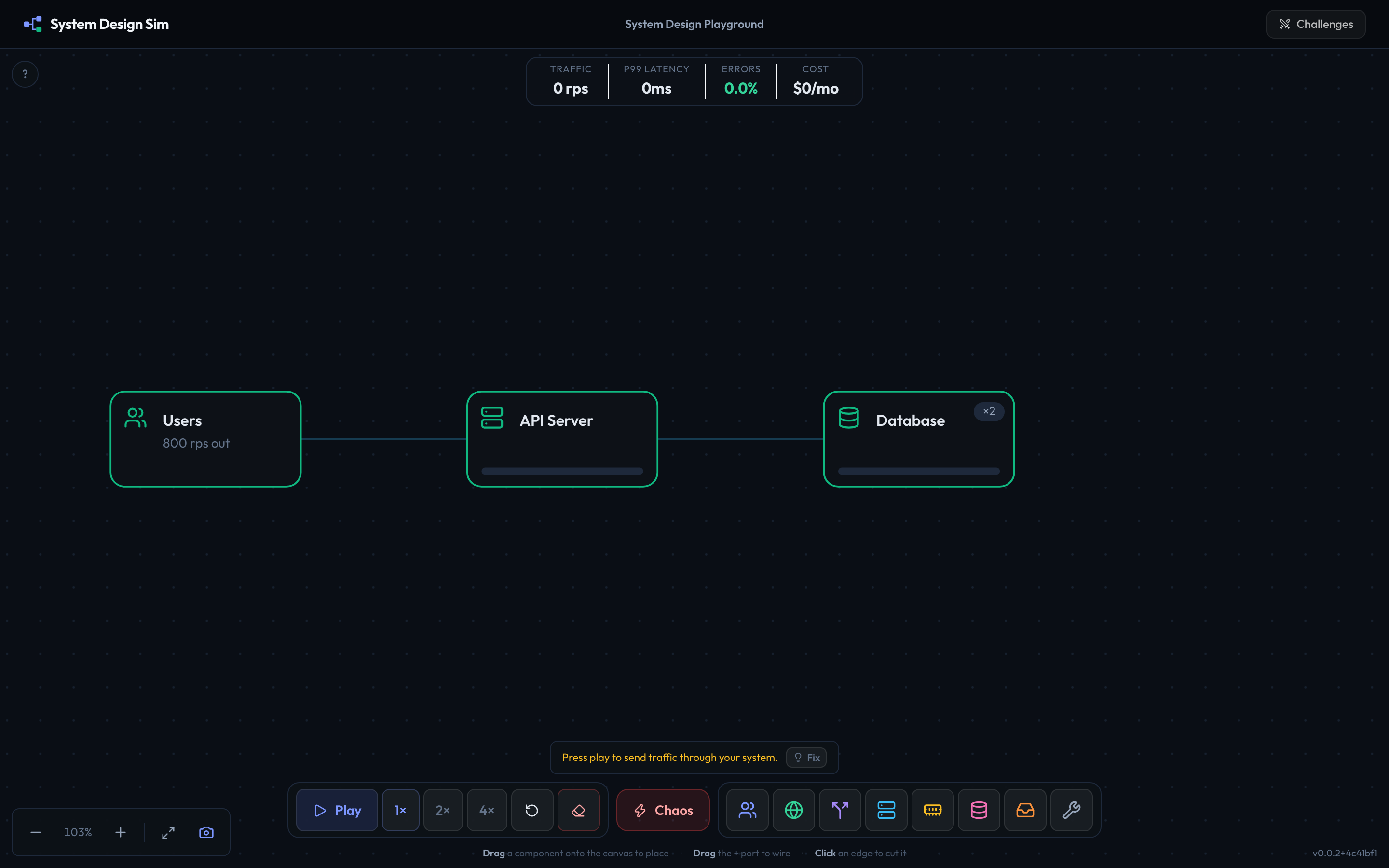
Start from a failing system and a set of targets. Drop in load balancers, API gateways, API servers, caches, queues, streams, SQL and NoSQL databases, object storage, search and CDNs, and wire them up.
Watch it break
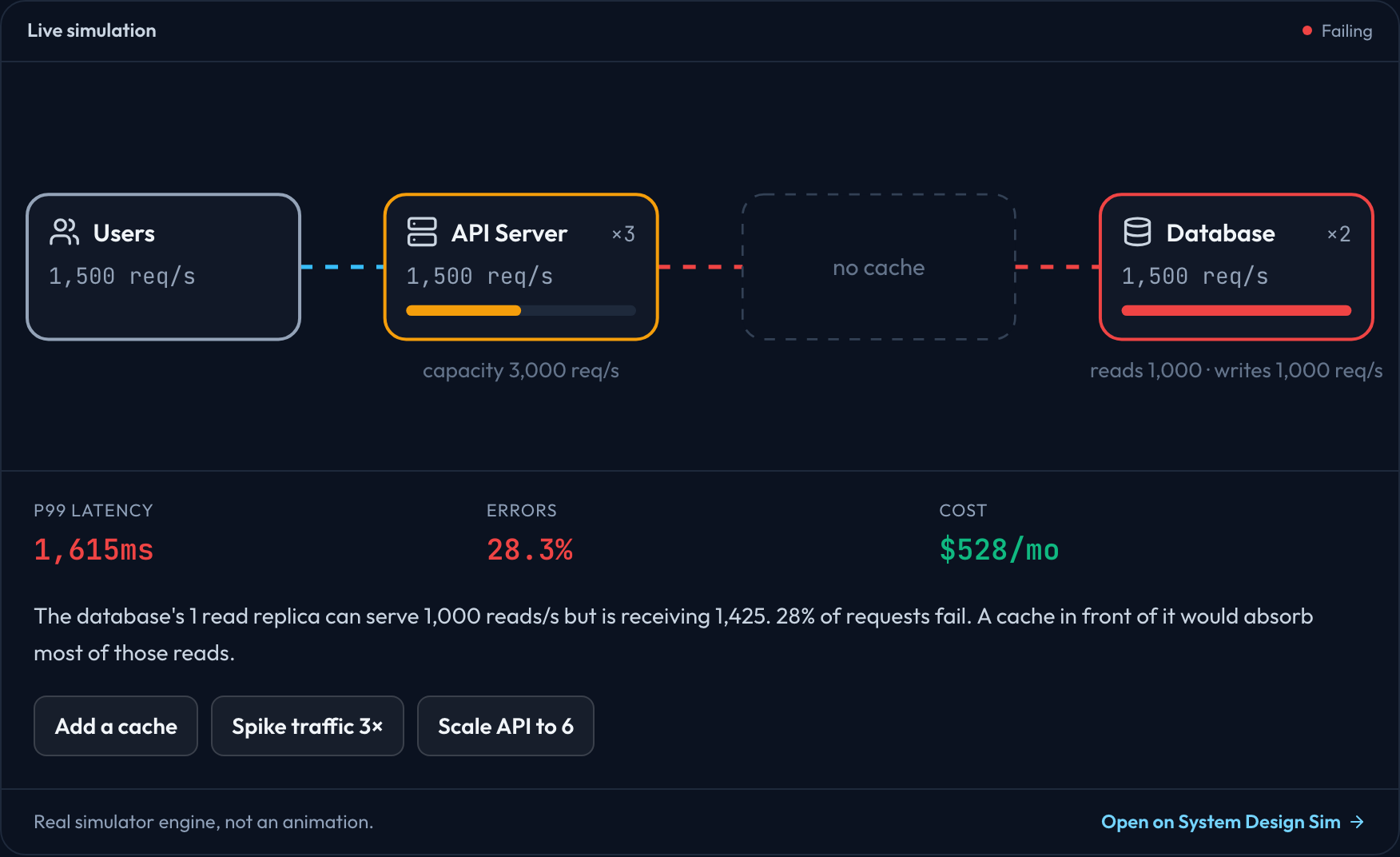
Send production-scale traffic. p99 latency, error rate and cost update every half second, and the component that fails first turns red.
Fix it and see why
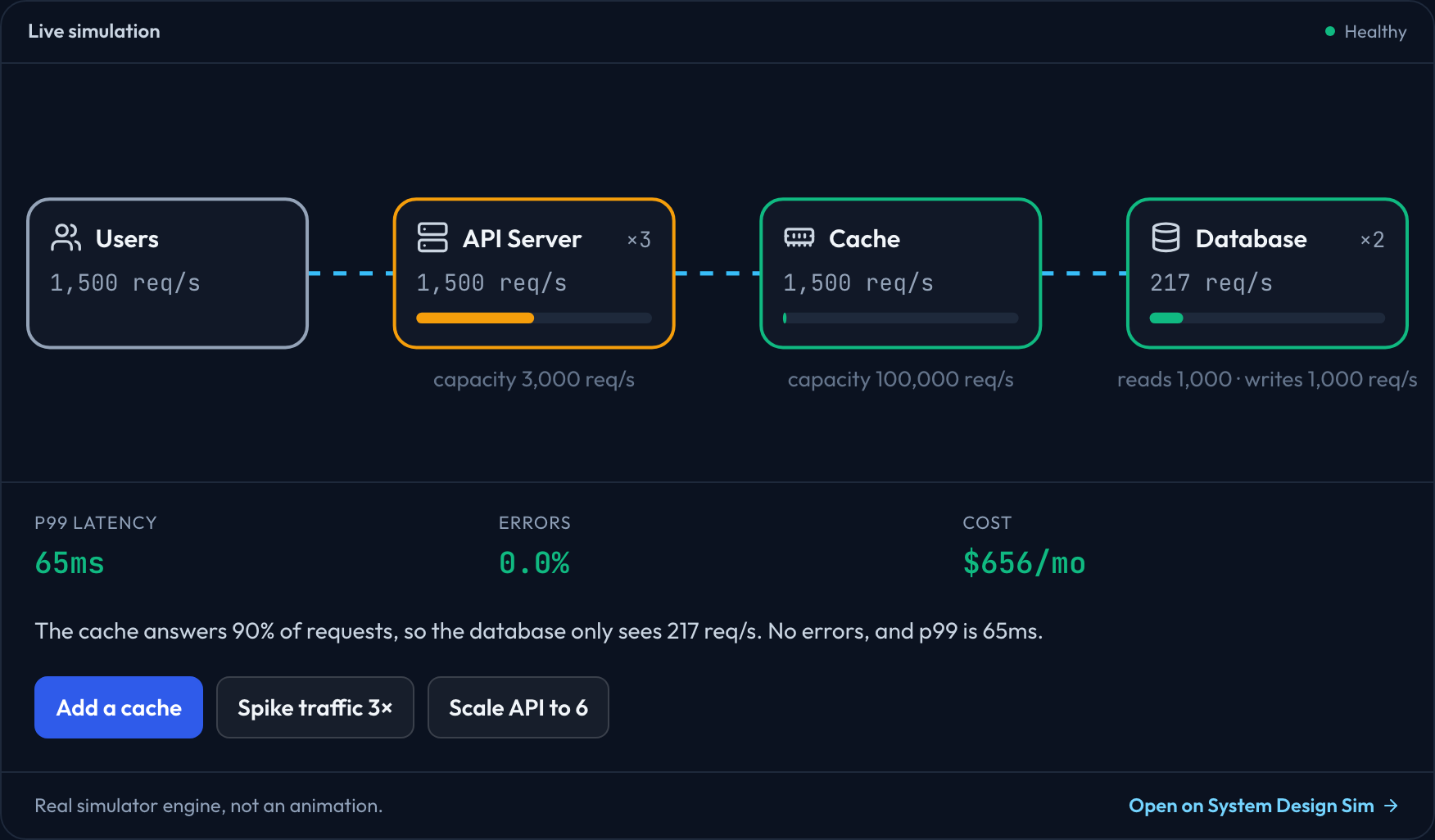
Change the design and run it again. The simulator explains the numbers: what the fix absorbed, and what becomes the next bottleneck.
Challenges
13 failing systems. Fix each one.
Every challenge hands you a broken architecture and a target to hold - latency, errors and cost - while traffic spikes, caches flush and nodes die.
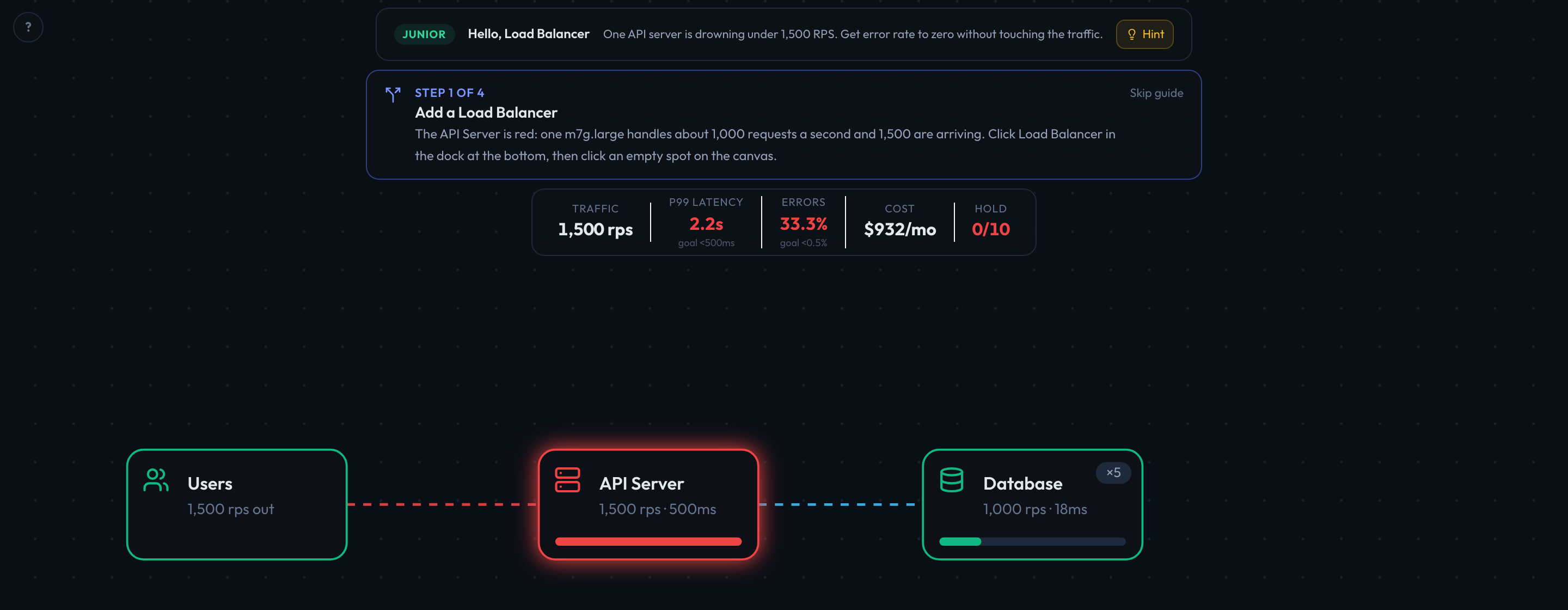
- 01Hello, Load BalancerJuniorOne API server is drowning under 1,500 RPS. Get error rate to zero without touching the traffic.p99 < 500ms · errors < 0.5% across 1 stage
- 02Cache MoneyJuniorYour database is at 95% utilization serving reads it has answered a thousand times. Cool it down below 50%.p99 < 150ms · errors < 0.5% across 1 stage
- 03Design a URL ShortenerMidRedirect traffic grows from 1,000 to 20,000 requests per second. Keep every redirect fast through a cache restart and a server failure at peak, within budget.p99 < 150ms · errors < 0.5% · cost < $5,000/month across 5 stages
- 04The StampedeMidYour cache will be flushed mid-run. Survive the stampede - keep errors under 5% while it refills.p99 < 800ms · errors < 0.5% across 2 stages
- 05Queue It UpMidWrite traffic spikes 5× partway through. Absorb the burst without dropping a single write.p99 < 2,000ms · errors < 0.5% across 3 stages
- 06Stop the Scraper FloodMidA scraper is about to hit your public API with 10× normal traffic. Keep real users' requests fast while the flood lasts, and be healthy again the moment it stops.p99 < 200ms · errors < 0.5% across 3 stages
- 07Design a Chat SystemSeniorMessages and history reads grow to 10,000 a second, then New Year's midnight triples it. Keep sends fast and every message delivered within 10 seconds, within budget.p99 < 300ms · errors < 0.5% · cost < $15,000/month across 4 stages
- 08Design a Notification SystemSeniorYour app sends push notifications through a provider that accepts 2,000 a second. Breaking news is about to multiply events 20×. Deliver every notification within a minute without the provider rejecting any.p99 < 300ms · errors < 0.5% · cost < $6,000/month across 3 stages
- 09Design a News FeedSeniorTimeline reads and new posts grow to 30,000 requests a second at peak. Keep timelines fast, get every post into followers' feeds and search within 10 seconds, within budget.p99 < 200ms · errors < 0.5% · cost < $15,000/month across 3 stages
- 10The Retry StormSeniorYour database is about to slow down by 400 ms. Your clients retry failures up to three times. Keep the API standing.p99 < 1,000ms · errors < 0.5% across 2 stages
- 11Black FridaySeniorTraffic is 12,000 RPS and the CFO capped infra at $3,000/month. Keep p99 under 300ms and errors under 1%.p99 < 300ms · errors < 1% · cost < $3,000/month across 2 stages
- 12Chaos MonkeyStaffA monkey will kill your busiest API server mid-run. Design for redundancy so users never notice.p99 < 500ms · errors < 2% across 2 stages
- 13The CTO Budget CutCTOThis system works - and burns about $15,000/month doing it. Hit the same SLOs for under $1,500/month.p99 < 250ms · errors < 0.5% · cost < $1,500/month across 1 stage
Guides
Learn the design, then break it yourself
Interview-ready walkthroughs - requirements, estimates, API, data model, deep dives - for the systems asked about most.
- Design an URL ShortenerRead-heavy scaling, caching
- Design a Chat SystemQueues, write scaling, delivery lag
- Design a Notification SystemQueues, provider rate limits, retries
- Design a Twitter TimelineFan-out and the celebrity problem
- Design an InstagramMedia uploads, feeds, hot accounts
- Design a YouTubeTranscoding pipeline, object storage, CDN
- Design a Netflix CDNEdge caching and the launch stampede
- Design a Rate LimiterToken bucket, distributed state
- Design an UberGeospatial indexing, matching
- Design a Web CrawlerPoliteness, dedup, the URL frontier
- Design a DropboxChunking, dedup, sync
- Design a Key-Value StorePartitioning, replication, quorums
- Design a Consistent HashingRebalancing with minimal movement
- Design a Caching StrategiesCache-aside, write-through, stampedes
- Design a RAG PipelineToken budgets, semantic cache
- Design an AI Agent SystemOrchestration, loops, cost per step
Who it's for
Built for backend engineers
Preparing for a senior system design interview
Practise the systems interviewers ask about - URL shorteners, feeds, rate limiters, CDNs - and explain trade-offs with numbers instead of buzzwords.
Moving from features to architecture
You know Redis, Kafka and Postgres. Learn when each one is the right call, and what breaks when it isn't.
Reviewing a design before it ships
Sanity-check where load will land and what fails first, and build intuition for capacity, failover and cost.
The model
A simple model you can check
No hidden randomness: the same design always gives the same result. Each component is a real AWS service and size with approximate prices. Reads and writes are tracked separately, p99 comes from queueing delay that climbs steeply near full capacity, traffic beyond capacity is dropped, and queues buffer instead of dropping.
| Component | AWS default | Capacity | Price |
|---|---|---|---|
| Scheduler | Amazon EventBridge Scheduler | scales automatically | per invocation |
| Route 53 | Amazon Route 53 (latency-based routing) | scales automatically | per DNS query |
| CDN | Amazon CloudFront | scales automatically | per request + GB |
| API Gateway | Amazon API Gateway (HTTP API) | 10,000 req/s default | per request |
| Load Balancer | Application Load Balancer (ALB) | scales automatically | per hour + traffic |
| API Server | m7g.large | ~1,000 req/s | $60/month |
| Worker | m7g.large | ~800 jobs/s | $60/month |
| Cache | cache.r7g.large | ~100,000 ops/s | $128/month |
| Database | db.r7g.large | ~1,000 queries/s | $174/month |
| NoSQL Database | Amazon DynamoDB (on-demand) | 3,000 reads/s per key | per request |
| Object Storage | Amazon S3 | 5,500 reads/s per key prefix | per request |
| Search | r7g.large.search | ~200 queries/s | $130/month |
| Queue | Amazon SQS | no practical limit | per request |
| Stream | Amazon Kinesis Data Streams | 1,000 records/s per shard | per shard-hour + records |
| External API | Third-party API | the provider's rate limit | by the provider |
FAQ
Frequently asked questions
Who is System Design Sim for?
Backend engineers - typically with two to seven years of experience - who are preparing for senior system design interviews or want to get better at architecture. Anyone who builds services that handle real traffic will find it useful.
Is System Design Sim free?
Yes. The simulator, the challenges and the system design guides are free to use, with no signup.
What is a system design simulator?
A tool where you build an architecture from real building blocks - load balancers, API servers, caches, queues, databases and CDNs - then send traffic through it and watch p99 latency, error rate and cost change live. Instead of reading that a database becomes the bottleneck, you watch it happen and fix it.
How accurate is the simulation?
It is a deliberately simple, deterministic model. Every component is a real AWS service and size with a rule-of-thumb capacity. Reads and writes are tracked separately, latency climbs steeply as a component nears full capacity, traffic beyond capacity is dropped, and queues buffer instead of dropping. It teaches how bottlenecks form and move - it is not a replacement for load testing your real system.
Will this help me with system design interviews?
Yes. You practise the systems interviewers ask about - URL shorteners, rate limiters, news feeds, CDNs - and learn to explain trade-offs with numbers: where the bottleneck is, what fixes it, and what it costs.
Does it model AWS, GCP or Azure?
AWS, with approximate prices. Servers are EC2 sizes like t4g.micro, m7g.large and c7g.xlarge; databases are RDS for PostgreSQL; caches are ElastiCache for Valkey; plus ALB, CloudFront and SQS. Prices are us-east-1 on-demand, read once in October 2026, so check AWS before you budget. GCP and Azure have equivalents that behave the same way.
Do I need to install anything or create an account?
No. Everything runs in your browser. Open a challenge and you are building within seconds.
How is this different from a course or a diagram tool?
A course shows you someone else's answer and a diagram tool accepts any design, right or wrong. Here your design runs: it holds up under traffic or it breaks, and you see exactly which component failed and why.
Find out where your design breaks.
The first challenge takes about two minutes. No signup.